Printer's internal Slot 3 (empty) is reported with ghost filament profile, causing slot misalignment in OrcaSlicer #55

Closed
opened 2026-06-14 20:25:24 +02:00 by Alex_M · 8 comments
Contributor

Description

There is a critical issue with filament slot mapping and synchronization between OrcaSlicer (KX), the network bridge, and the Anycubic Kobra X / ACE 2 Pro setup.

Specifically, OrcaSlicer keeps detecting a "phantom" filament (a residual "Generic ABS" profile) in Slot 3, even though that slot is physically empty. Because of this ghost profile, OrcaSlicer completely miscalculates the tool head index when sending a print, leading to wrong slot selections and loading problems.

image.png

image.png

Steps to Reproduce

  1. Leave Slot 3 physically empty. Load a PETG filament in Slot 5 (which is indexed as Slot 6 in Anycubic's official Ecosystem).
  2. In OrcaSlicer, the device tab still stubbornly shows a "Generic ABS" profile in the empty Slot 3 instead of clearing it.
  3. Slice a model using the PETG filament and send it via LAN.
  4. The job is sent instantly without showing any confirmation or slot-mapping window.
  5. The printer receives a T4 command, but instead of printing with PETG, it enters an retraction/reloading loop or targets the wrong slot (e.g., Slot 4 containing PLA).

Crucial Finding: Comparison with Anycubic Slicer Next

I compared the G-code generated by both slicers for the exact same model, and found a major translation issue:

  • Anycubic Slicer Next: Graphically displays the PETG assigned to Slot 6 in its "Start Print" dialogue window, but under the hood it translates this and correctly writes a T3 command in the G-code, making the print work flawlessly.

image.png

  • OrcaSlicer: Missing the "Start Print" confirmation/translation window entirely, it generates a T4 command, completely breaking the virtual-to-physical slot mapping.

Questions for the Developers:

  1. Why does OrcaSlicer/the bridge fail to clear out the old filament profile from an empty slot (Slot 3), keeping it cached as "Generic ABS"? Is there a way to force a sync/clear?
  2. Is the "Start Print" pop-up summary/mapping window supposed to be integrated into OrcaSlicer (KX) to handle this slot translation layer, or is it a known limitation of the current network plugin?
### Description There is a critical issue with filament slot mapping and synchronization between OrcaSlicer (KX), the network bridge, and the Anycubic Kobra X / ACE 2 Pro setup. Specifically, OrcaSlicer keeps detecting a "phantom" filament (a residual "Generic ABS" profile) in **Slot 3**, even though that slot is physically empty. Because of this ghost profile, OrcaSlicer completely miscalculates the tool head index when sending a print, leading to wrong slot selections and loading problems. ![image.png](/attachments/c78d5a77-2ec3-486c-89e8-b9b68477ce9d) ![image.png](/attachments/e3e22c42-4b14-4834-b438-46c0e8c03ae1) ### Steps to Reproduce 1. Leave Slot 3 physically empty. Load a PETG filament in Slot 5 (which is indexed as Slot 6 in Anycubic's official Ecosystem). 2. In OrcaSlicer, the device tab still stubbornly shows a "Generic ABS" profile in the empty Slot 3 instead of clearing it. 3. Slice a model using the PETG filament and send it via LAN. 4. The job is sent instantly without showing any confirmation or slot-mapping window. 5. The printer receives a `T4` command, but instead of printing with PETG, it enters an retraction/reloading loop or targets the wrong slot (e.g., Slot 4 containing PLA). ### Crucial Finding: Comparison with Anycubic Slicer Next I compared the G-code generated by both slicers for the exact same model, and found a major translation issue: * **Anycubic Slicer Next:** Graphically displays the PETG assigned to **Slot 6** in its "Start Print" dialogue window, but under the hood it translates this and correctly writes a **`T3`** command in the G-code, making the print work flawlessly. ![image.png](/attachments/e60257a0-ff83-4003-a80f-07235d8901ae) * **OrcaSlicer:** Missing the "Start Print" confirmation/translation window entirely, it generates a **`T4`** command, completely breaking the virtual-to-physical slot mapping. ### Questions for the Developers: 1. Why does OrcaSlicer/the bridge fail to clear out the old filament profile from an empty slot (Slot 3), keeping it cached as "Generic ABS"? Is there a way to force a sync/clear? 2. Is the "Start Print" pop-up summary/mapping window supposed to be integrated into OrcaSlicer (KX) to handle this slot translation layer, or is it a known limitation of the current network plugin?
Contributor

I patched out place holder filament for empty slots in a previous build. But it was brought back in for one reason or another. I'm not sure why. Maybe unintentionally. Anyway, I'm curious if you're mainly using upload and print? I would recommend just pressing upload, with auto switch to device, then using the filament mapper in kx-bridge. It's a similar workflow to Slicer Next. e.g. Press print, select which colors to use, and print
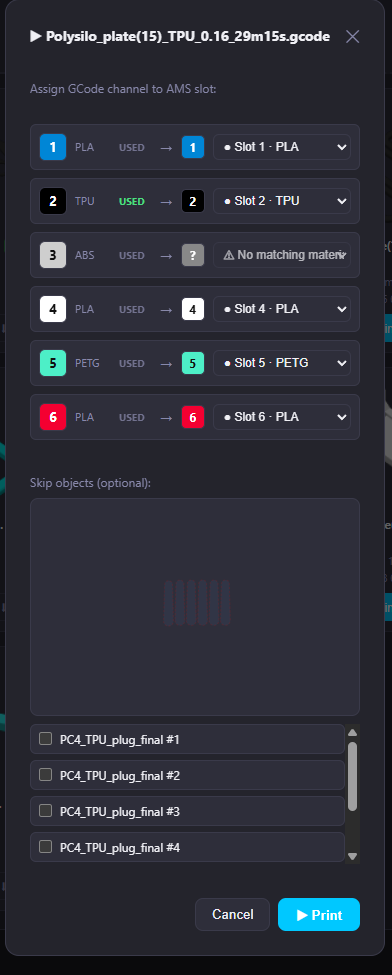
This printed sucessfully. Slot 3 empty when i sync'd giving me a placehoser abs filament. Only the mapped USED filament goes through.
image.png

I patched out place holder filament for empty slots in a previous build. But it was brought back in for one reason or another. I'm not sure why. Maybe unintentionally. Anyway, I'm curious if you're mainly using upload and print? I would recommend just pressing upload, with auto switch to device, then using the filament mapper in kx-bridge. It's a similar workflow to Slicer Next. e.g. Press print, select which colors to use, and print This printed sucessfully. Slot 3 empty when i sync'd giving me a placehoser abs filament. Only the mapped USED filament goes through. <img width="294" alt="image.png" src="attachments/9d72aced-421f-4402-a8e1-6dfd88dbbbd7">
Owner

Thanks for the detailed report, @Alex_M.

This is difficult for us to reproduce end-to-end because neither of us has an ACE 2 Pro / hub setup. Notably, @gangoke — who contributed the majority of the ACE support — was also unable to reproduce the slot-mapping issue.

A few thoughts on what you are seeing:

T3 vs T4 — Anycubic vs OrcaSlicer indexing
Anycubic Slicer Next applies its own internal slot-translation layer before writing the T command into the GCode. "Slot 6" in the UI becomes T3 because Anycubic counts across boxes with its own offset logic. OrcaSlicer does not have this translation layer — it writes the slot index as it sees it. This difference is a fundamental incompatibility between the two slicers and is not caused by the bridge.

Workaround for now
Instead of printing directly from OrcaSlicer, use the upload-and-map workflow:

  1. In OrcaSlicer, upload the file (do not print directly)
  2. Open the KX-Bridge Web UI, go to the file and start the print from there
  3. The bridge will show the filament-mapper dialog — assign your slots there

This gives you the same confirmation/mapping step you know from Slicer Next and bypasses the GCode T-index issue entirely.

Ghost ABS in empty slot
We are aware of the cosmetic issue where an empty slot retains the last known filament profile in OrcaSlicer instead of clearing it. We will address this.

OrcaSlicer-KX
Our build includes only the patches necessary for Kobra X compatibility on top of upstream OrcaSlicer. It is still an alpha build and edge cases — especially with multi-box ACE hub setups — may not be fully covered yet.

Thanks for the detailed report, @Alex_M. This is difficult for us to reproduce end-to-end because neither of us has an ACE 2 Pro / hub setup. Notably, @gangoke — who contributed the majority of the ACE support — was also unable to reproduce the slot-mapping issue. A few thoughts on what you are seeing: **T3 vs T4 — Anycubic vs OrcaSlicer indexing** Anycubic Slicer Next applies its own internal slot-translation layer before writing the `T` command into the GCode. "Slot 6" in the UI becomes `T3` because Anycubic counts across boxes with its own offset logic. OrcaSlicer does not have this translation layer — it writes the slot index as it sees it. This difference is a fundamental incompatibility between the two slicers and is not caused by the bridge. **Workaround for now** Instead of printing directly from OrcaSlicer, use the upload-and-map workflow: 1. In OrcaSlicer, **upload** the file (do not print directly) 2. Open the KX-Bridge Web UI, go to the file and start the print from there 3. The bridge will show the filament-mapper dialog — assign your slots there This gives you the same confirmation/mapping step you know from Slicer Next and bypasses the GCode `T`-index issue entirely. **Ghost ABS in empty slot** We are aware of the cosmetic issue where an empty slot retains the last known filament profile in OrcaSlicer instead of clearing it. We will address this. **OrcaSlicer-KX** Our build includes only the patches necessary for Kobra X compatibility on top of upstream OrcaSlicer. It is still an alpha build and edge cases — especially with multi-box ACE hub setups — may not be fully covered yet.
Author
Contributor

Hi Viewit and gangoke,

Thanks for the comprehensive breakdown! The explanation about OrcaSlicer lacking the internal slot-translation layer makes total sense. The upload-and-map workflow is a perfect workaround, and I’m glad to hear the ghost ABS issue is on your radar.

Testing this workflow brought up a UX improvement suggestion regarding how the Web UI handles files that are uploaded but not actively printing. Here is a quick breakdown of the current behavior:

When uploading a file (e.g., the Sphere), the green action bar appears at the top, and the object populates the Progress window.

If I start the print and then cancel/stop it immediately, the green bar disappears. However, the file remains loaded inside the Progress window. If I want to retry or clear it from here, I am stuck: I have to navigate to the Browser tab to trigger it again.

If I upload a new file (e.g., the Cube), the green bar correctly returns for the new file.

If I click "Cancel" on this new file, the green bar vanishes, the cube (rightly) disappears, and the UI reverts back to showing the previous cached file (the Sphere) in the Progress window, still with no way to interact with it directly.

The Suggestion:
To improve the workflow, you could:

Keep or bring back the green action bar if a file is still loaded/idle in the Progress status?

Alternatively (and ideally): Add dedicated context buttons (e.g., Print / Map Slots / Clear) directly inside the Progress card when a job is idle or interrupted?

This would prevent users from having to jump back and forth between the Dashboard and the Browser just to restart an interrupted print that the UI is already displaying.

Thanks again for the incredible work on this bridge!

Hi Viewit and gangoke, Thanks for the comprehensive breakdown! The explanation about OrcaSlicer lacking the internal slot-translation layer makes total sense. The upload-and-map workflow is a perfect workaround, and I’m glad to hear the ghost ABS issue is on your radar. Testing this workflow brought up a UX improvement suggestion regarding how the Web UI handles files that are uploaded but not actively printing. Here is a quick breakdown of the current behavior: When uploading a file (e.g., the Sphere), the green action bar appears at the top, and the object populates the Progress window. If I start the print and then cancel/stop it immediately, the green bar disappears. However, the file remains loaded inside the Progress window. If I want to retry or clear it from here, I am stuck: I have to navigate to the Browser tab to trigger it again. If I upload a new file (e.g., the Cube), the green bar correctly returns for the new file. If I click "Cancel" on this new file, the green bar vanishes, the cube (rightly) disappears, and the UI reverts back to showing the previous cached file (the Sphere) in the Progress window, still with no way to interact with it directly. The Suggestion: To improve the workflow, you could: Keep or bring back the green action bar if a file is still loaded/idle in the Progress status? Alternatively (and ideally): Add dedicated context buttons (e.g., Print / Map Slots / Clear) directly inside the Progress card when a job is idle or interrupted? This would prevent users from having to jump back and forth between the Dashboard and the Browser just to restart an interrupted print that the UI is already displaying. Thanks again for the incredible work on this bridge!
Contributor

Jumping in on the ideas I think it should auto launch Slot Mapper on upload instead of launching the print bar. Slot Mapper has all functions of the print bar Start, Select Colors, and Cancel. This also matches the print from file browser workflow. And brings the workflow more similar to slicer next. Also would like to have bed leveling option on the Slot Mapper so user can turn it on/off per print instead of turning on/off in the settings. Again, bringing it more similar to slicer next.

Alternatively (and ideally): Add dedicated context buttons (e.g., Print / Map Slots / Clear) directly inside the Progress card when a job is idle or interrupted?

Liking this idea. Really we only need to add Print/Clear buttons when printer is not printing. For the Print button, can actually just re-use the function of Print button from file browser. That already auto launches the Slot Mapper

If I click "Cancel" on this new file, the green bar vanishes, the cube (rightly) disappears, and the UI reverts back to showing the previous cached file (the Sphere) in the Progress window, still with no way to interact with it directly.

I'm trying to wrap my head around the best logic to prioritize what file is loaded in progress, obviously currently printing is top priority. But then what is it when not printing? last uploaded? last printed? last printed unless last upload newer than X minutes maybe?

Sorry for rambling, might be exahusting this thread

EDIT: WIP

Jumping in on the ideas I think it should auto launch Slot Mapper on upload instead of launching the print bar. Slot Mapper has all functions of the print bar Start, Select Colors, and Cancel. This also matches the print from file browser workflow. And brings the workflow more similar to slicer next. Also would like to have bed leveling option on the Slot Mapper so user can turn it on/off per print instead of turning on/off in the settings. Again, bringing it more similar to slicer next. > Alternatively (and ideally): Add dedicated context buttons (e.g., Print / Map Slots / Clear) directly inside the Progress card when a job is idle or interrupted? Liking this idea. Really we only need to add Print/Clear buttons when printer is not printing. For the Print button, can actually just re-use the function of Print button from file browser. That already auto launches the Slot Mapper > If I click "Cancel" on this new file, the green bar vanishes, the cube (rightly) disappears, and the UI reverts back to showing the previous cached file (the Sphere) in the Progress window, still with no way to interact with it directly. I'm trying to wrap my head around the best logic to prioritize what file is loaded in progress, obviously currently printing is top priority. But then what is it when not printing? last uploaded? last printed? last printed unless last upload newer than X minutes maybe? Sorry for rambling, might be exahusting this thread EDIT: WIP
Author
Contributor

Hi gangoke,

First of all, don't worry about rambling—this is exactly the kind of brainstorming that makes open-source development awesome!

Since these UI and workflow improvements are shifting away from the original mapping bug, I want to avoid cluttering this ticket. I'm going to open a dedicated Feature Request/Issue to safely continue this UX discussion there and deep-dive into your WIP ideas. Let's move over there!

Hi gangoke, First of all, don't worry about rambling—this is exactly the kind of brainstorming that makes open-source development awesome! Since these UI and workflow improvements are shifting away from the original mapping bug, I want to avoid cluttering this ticket. I'm going to open a dedicated Feature Request/Issue to safely continue this UX discussion there and deep-dive into your WIP ideas. Let's move over there!
Owner

ui sugestions allready done ;-) release today .

ui sugestions allready done ;-) release today .
Contributor

oh shoot, i was about to submit a PR

oh shoot, i was about to submit a PR
viewit reopened this issue 2026-06-16 13:07:40 +02:00
Owner

The idle file actions are included in v0.9.22 (released today).

After uploading a file while the printer is idle, three quick-action buttons now appear directly in the progress card: ▶ Print, ⚙ Map Slots, and ✕ Clear — no need to navigate to the file browser.

The idle file actions are included in **v0.9.22** (released today). After uploading a file while the printer is idle, three quick-action buttons now appear directly in the progress card: **▶ Print**, **⚙ Map Slots**, and **✕ Clear** — no need to navigate to the file browser.
Sign in to join this conversation.
3 Participants
Notifications
Due Date
No due date set.
Dependencies

No dependencies set.

Reference: viewit/KX-Bridge-Release#55
No description provided.