Optimize Upload-and-Print Workflow, Progress Card Controls & Slot Mapper parity #57

Closed
opened 2026-06-16 13:20:11 +02:00 by Alex_M · 8 comments
Contributor

Context & Goal
Moving the conversation from Ticket #55 regarding @gangoke's WIP ideas to optimize the UX/UI of the KX-Bridge when printing and mapping. The goal is to bring the interface closer to the seamless experience of Anycubic Slicer Next while adding missing flexibility.

Here is the structured feedback on the proposed workflow and some additional ideas:

  1. Auto-launching the Slot Mapper on Upload & Bed Leveling Toggle
    We absolutely love this idea. Bypassing the green action bar and jumping straight into the Slot Mapper on an upload command is much cleaner. It perfectly replicates the Slicer Next experience and eliminates redundant steps.
    Adding the Bed Leveling toggle directly inside the Slot Mapper is also a massive quality-of-life improvement.

  2. The Buttons in Progress & the Priority Logic Dilemma
    Reusing the File Browser's print function to inject Print/Clear buttons into the Progress card when IDLE is exactly what we need.

    Regarding the priority logic for which file should be loaded in the Progress view when the printer is not active, here is a logical hierarchy suggestion to keep the UI aligned with the user's latest intent:

    • Priority 1 (Top): Active Print. (Self-explanatory).
    • Priority 2: The Newly Uploaded File. If a file is sent via "Upload", that file represents immediate intent. It should instantly take over the Progress window and trigger the Slot Mapper.
    • Priority 3: The Interrupted/Canceled Upload. If the user opens the Mapper and clicks "Cancel" (or if a print is stopped at 0%), that file should remain visible in the Progress card with the new Print/Clear buttons available. This allows for an easy retry.
    • Priority 4 (Fallback): The Last Successfully Printed File. If the user manually clicks "Clear" on an idle file, then the Progress card can clear out or revert to showing the last successfully printed file as a historical reference.
  3. Slot Mapper Feature Parity: "Skip Objects" Everywhere
    When the Slot Mapper is launched from the KX-Bridge Browser tab, it nicely shows the Skip objects (optional) panel at the bottom. However, this section is missing when a print job is handled through other flows.

    Suggestion: We should achieve full feature parity across the board. The Skip Objects section should always be embedded within the Slot Mapper UI, regardless of how it was triggered. To prevent the popup from becoming too bulky, it could be hidden by default behind a collapsible button/dropdown, expanding only when clicked.

  4. Slot Mapper UI: Display Specific Filament Profile Name Instead of Just Generic Type
    In the Slot Mapper interface each slot currently displays the generic filament_type (e.g., PLA) and the filament_vendor underneath it.
    To make it more precise and user-friendly, it would be amazing if the UI could display the specific profile name instead of just the generic type.

    Suggestion: The UI should clean up the string "filament_settings_id" and display either just the specific variant (e.g., stripping the vendor and printer info to show "PLA Matte").
    Alternatively (and even better for consistency): Display the exact full profile name as it already appears inside the slot's dropdown menu (e.g., "Anycubic PLA Matte" or user presets like "Tinmorry PLA Matte").
    This would give the user immediate visual confirmation of the exact material profile assigned to that slot at a single glance, without having to open the dropdown menu.

Looking forward to your thoughts on this! Thank you for the incredible dedication to refining this UX.

Context & Goal Moving the conversation from Ticket #55 regarding @gangoke's WIP ideas to optimize the UX/UI of the KX-Bridge when printing and mapping. The goal is to bring the interface closer to the seamless experience of Anycubic Slicer Next while adding missing flexibility. Here is the structured feedback on the proposed workflow and some additional ideas: 1. Auto-launching the Slot Mapper on Upload & Bed Leveling Toggle We absolutely love this idea. Bypassing the green action bar and jumping straight into the Slot Mapper on an upload command is much cleaner. It perfectly replicates the Slicer Next experience and eliminates redundant steps. Adding the Bed Leveling toggle directly inside the Slot Mapper is also a massive quality-of-life improvement. 2. The Buttons in Progress & the Priority Logic Dilemma Reusing the File Browser's print function to inject Print/Clear buttons into the Progress card when IDLE is exactly what we need. Regarding the priority logic for which file should be loaded in the Progress view when the printer is not active, here is a logical hierarchy suggestion to keep the UI aligned with the user's latest intent: * Priority 1 (Top): Active Print. (Self-explanatory). * Priority 2: The Newly Uploaded File. If a file is sent via "Upload", that file represents immediate intent. It should instantly take over the Progress window and trigger the Slot Mapper. * Priority 3: The Interrupted/Canceled Upload. If the user opens the Mapper and clicks "Cancel" (or if a print is stopped at 0%), that file should remain visible in the Progress card with the new Print/Clear buttons available. This allows for an easy retry. * Priority 4 (Fallback): The Last Successfully Printed File. If the user manually clicks "Clear" on an idle file, then the Progress card can clear out or revert to showing the last successfully printed file as a historical reference. 3. Slot Mapper Feature Parity: "Skip Objects" Everywhere When the Slot Mapper is launched from the KX-Bridge Browser tab, it nicely shows the Skip objects (optional) panel at the bottom. However, this section is missing when a print job is handled through other flows. Suggestion: We should achieve full feature parity across the board. The Skip Objects section should always be embedded within the Slot Mapper UI, regardless of how it was triggered. To prevent the popup from becoming too bulky, it could be hidden by default behind a collapsible button/dropdown, expanding only when clicked. 4. Slot Mapper UI: Display Specific Filament Profile Name Instead of Just Generic Type In the Slot Mapper interface each slot currently displays the generic filament_type (e.g., PLA) and the filament_vendor underneath it. To make it more precise and user-friendly, it would be amazing if the UI could display the specific profile name instead of just the generic type. Suggestion: The UI should clean up the string "filament_settings_id" and display either just the specific variant (e.g., stripping the vendor and printer info to show "PLA Matte"). Alternatively (and even better for consistency): Display the exact full profile name as it already appears inside the slot's dropdown menu (e.g., "Anycubic PLA Matte" or user presets like "Tinmorry PLA Matte"). This would give the user immediate visual confirmation of the exact material profile assigned to that slot at a single glance, without having to open the dropdown menu. Looking forward to your thoughts on this! Thank you for the incredible dedication to refining this UX.
Contributor

@viewit said they made some changes and put out a new build. I havent check it out yet. I also submitted a PR #56 at the same time. I'll come back to this tomorrow and see what to salvage from it to add to the next build.

@viewit said they made some changes and put out a new build. I havent check it out yet. I also submitted a PR #56 at the same time. I'll come back to this tomorrow and see what to salvage from it to add to the next build.
viewit added the
enhancement
label 2026-06-16 18:58:23 +02:00
Owner

Hi @Alex_M, thank you for this thorough and well-structured feedback — it's genuinely a pleasure to work from. Here's where each point stands:

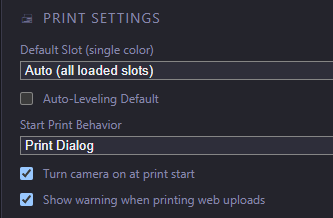
1. Auto-launch Slot Mapper on upload + Bed-Leveling toggle — shipped in 0.9.23.
Uploading a file while the printer is idle now opens the Slot Mapper automatically (new Start Print Behavior setting under Settings → Printer; you can switch back to the print bar if you prefer). The auto-leveling toggle now lives inside the dialog and overrides the global default per print. While building this we also fixed the long-standing object-skip bug (skip was sent before the printer reached the printing state and got dropped) — credit to @gangoke whose PR analysis surfaced it.

3. "Skip Objects" parity across all flows — implemented (in testing).
The Skip Objects panel now appears in every Slot Mapper flow, not just the Browser tab. As you suggested, it's collapsed by default behind a ✂ Skip objects (N) header to keep the dialog compact, and expands on click (with the SVG preview + checklist). This will ship in the next release.

4. Show the specific profile name instead of the generic type — implemented (in testing).
Each slot now shows its mapped profile name (e.g. PolyTerra PLA — Polymaker) instead of just PLA, both in the dropdown options and as a hover tooltip on the slot marker. If no profile is mapped for a slot, it falls back to the generic type. (The full per-slot profile mapping lives under Settings → Filament.)

2. Progress-card buttons + priority hierarchy — partially done, the priority logic is the open piece.
The idle action buttons (▶ Print / ⚙ Map Slots / ✕ Clear) already landed in 0.9.22. Your proposed priority hierarchy (P1 active print → P2 newest upload → P3 cancelled/interrupted upload stays visible for retry → P4 fallback to last printed file) is a clean model and matches the direction we want. It's a slightly larger state-tracking change than 3 & 4, so I'm treating it as a follow-up — the P3 "cancelled upload stays available" behaviour in particular ties into the dialog-cancel handling we just reworked, so it's a natural next step.

Thanks again — points 3 & 4 go out in the next build, and I'll tackle the priority logic after. 🙏

Hi @Alex_M, thank you for this thorough and well-structured feedback — it's genuinely a pleasure to work from. Here's where each point stands: **1. Auto-launch Slot Mapper on upload + Bed-Leveling toggle — ✅ shipped in 0.9.23.** Uploading a file while the printer is idle now opens the Slot Mapper automatically (new *Start Print Behavior* setting under Settings → Printer; you can switch back to the print bar if you prefer). The auto-leveling toggle now lives inside the dialog and overrides the global default per print. While building this we also fixed the long-standing object-skip bug (skip was sent before the printer reached the `printing` state and got dropped) — credit to @gangoke whose PR analysis surfaced it. **3. "Skip Objects" parity across all flows — ✅ implemented (in testing).** The Skip Objects panel now appears in *every* Slot Mapper flow, not just the Browser tab. As you suggested, it's collapsed by default behind a `✂ Skip objects (N)` header to keep the dialog compact, and expands on click (with the SVG preview + checklist). This will ship in the next release. **4. Show the specific profile name instead of the generic type — ✅ implemented (in testing).** Each slot now shows its mapped profile name (e.g. *PolyTerra PLA — Polymaker*) instead of just `PLA`, both in the dropdown options and as a hover tooltip on the slot marker. If no profile is mapped for a slot, it falls back to the generic type. (The full per-slot profile mapping lives under Settings → Filament.) **2. Progress-card buttons + priority hierarchy — partially done, the priority logic is the open piece.** The idle action buttons (▶ Print / ⚙ Map Slots / ✕ Clear) already landed in 0.9.22. Your proposed priority hierarchy (P1 active print → P2 newest upload → P3 cancelled/interrupted upload stays visible for retry → P4 fallback to last printed file) is a clean model and matches the direction we want. It's a slightly larger state-tracking change than 3 & 4, so I'm treating it as a follow-up — the P3 "cancelled upload stays available" behaviour in particular ties into the dialog-cancel handling we just reworked, so it's a natural next step. Thanks again — points 3 & 4 go out in the next build, and I'll tackle the priority logic after. 🙏
Contributor
  1. Progress-card buttons + priority hierarchy — partially done, the priority logic is the open piece.

When printer is idle, progress print button just starts the print. Does it use its previously set mappings?
Also, the Map Slots button doesn't include skip objects. Wondering if Print should launch the print start dialog, and remove the Map Slots button as it'll be redundant?

Option 1
If Print uses the previously used mappings, update the Map Slots button launch print start dialog.

Option 2
If Print button behaves the same as orca upload and print. Change behavior to launch print start dialog, and remove map slots button.

Option 3
If Print button behaves the same as orca upload and print.
Enable storing of the mappings of the file and have it default it to use when starting print with the Print button. Update the Map Slots button to launch print start dialog

EDIT: Also, when IDLE, Clear should actually clear, not reload whatever is next in priority.

> 2. Progress-card buttons + priority hierarchy — partially done, the priority logic is the open piece. When printer is idle, progress print button just starts the print. Does it use its previously set mappings? Also, the Map Slots button doesn't include skip objects. Wondering if Print should launch the print start dialog, and remove the Map Slots button as it'll be redundant? Option 1 If Print uses the previously used mappings, update the Map Slots button launch print start dialog. Option 2 If Print button behaves the same as orca upload and print. Change behavior to launch print start dialog, and remove map slots button. Option 3 If Print button behaves the same as orca upload and print. Enable storing of the mappings of the file and have it default it to use when starting print with the Print button. Update the Map Slots button to launch print start dialog EDIT: Also, when IDLE, Clear should actually clear, not reload whatever is next in priority.
Contributor

Edit2: PR #60 fixes issues below and more

  1. Auto-launch Slot Mapper on upload

Auto launch on Orca upload and file browser upload, with Setting set to Print Dialog launches both print dialog and print bar. File Browser print button working correctly. Setting set to Print Bar correctly only launches Print Bar on uploads

Selected objects to skip are not reflecting in ui, and not skipping + Auto Level setting is not setting correctly on Orca upload, file browser upload, and Progress Map Slots button. The File Browser Print button is working flawlessly

image.png

1...+ Bed-Leveling toggle

Auto-Leveling on Print Dialog not respecting Setting Default
image.pngimage.png

Edit: Skip Objects on print start has ui issues and not skipping properly.

Working on a fix for issues in THIS post

# Edit2: PR #60 fixes issues below and more > 1. Auto-launch Slot Mapper on upload Auto launch on Orca upload and file browser upload, with Setting set to Print Dialog launches both print dialog and print bar. File Browser print button working correctly. Setting set to Print Bar correctly only launches Print Bar on uploads Selected objects to skip are not reflecting in ui, and not skipping + Auto Level setting is not setting correctly on Orca upload, file browser upload, and Progress Map Slots button. The File Browser Print button is working flawlessly <img width="625" alt="image.png" src="attachments/0553efc2-733c-49d8-ad3f-fa662580449e"> >1...+ Bed-Leveling toggle Auto-Leveling on Print Dialog not respecting Setting Default ![image.png](/attachments/95bf8479-5872-4a3f-bae2-fbade4dd5c9f)![image.png](/attachments/d6eca2d3-817a-4b4b-881b-9b40db6dbea3) Edit: Skip Objects on print start has ui issues and not skipping properly. Working on a fix for issues in THIS post
Author
Contributor

Hi @viewit and @gangoke,
I've been actively testing v0.9.25, and while the progress is amazing, I’ve hit a few critical bugs and UI desyncs that align perfectly with what gangoke noticed in PR #60. Here is what’s happening, referenced with screenshots:

  1. Filament Profile Mapping Desync (Settings vs Dashboard)

image.png

image.png

  • The new Master-Detail settings panel displays the slot mapping, but the Dashboard doesn't mirror these changes.

  • The profile mapping fields act as free text inputs. If I manually edit a field (for example, adding a + to eSUN in Slot 1), the connection to the actual Orca profile instantly breaks. When editing Slot 1 afterwards, it falls back to Generic (default) because the modified string no longer matches the explicit profile ID.

    Suggestion: These fields probably shouldn't be free text inputs, or they need stricter validation to prevent users from breaking the profile matching logic.

  1. Start Print Behavior Collisions & Missing Skip Objects

image.png

  • When setting the behavior to "Print Dialog" and uploading from Orca, I experienced the exact collision gangoke mentioned — both the green top bar and the Slot Mapper modal opened simultaneously. Furthermore, after switching settings back and forth between "Print Bar" and "Print Dialog", the Slot Mapper stopped automatically appearing entirely, defaulting only to the green bar. The UI settings state seems to get corrupted.

  • Missing Panel: As you can also see in image, the Skip Objects panel is completely missing from this flow, confirming gangoke's analysis that it isn't properly reflecting outside of the direct file browser flow yet.

  1. Slot 3 Ghost Filament.
    Just a quick confirmation: the "Generic ABS" ghost profile is still persisting in empty Slot 3.

Hopefully, these visual samples help clarify the edge cases for PR #60 cleanup.

Hi @viewit and @gangoke, I've been actively testing v0.9.25, and while the progress is amazing, I’ve hit a few critical bugs and UI desyncs that align perfectly with what gangoke noticed in PR #60. Here is what’s happening, referenced with screenshots: 1. Filament Profile Mapping Desync (Settings vs Dashboard) ![image.png](/attachments/e493d267-b7d1-4035-a871-b412e5d09c20) ![image.png](/attachments/ead509a9-d01d-4e8e-8ddc-05e0831d6c3f) - The new Master-Detail settings panel displays the slot mapping, but the Dashboard doesn't mirror these changes. - The profile mapping fields act as free text inputs. If I manually edit a field (for example, adding a + to eSUN in Slot 1), the connection to the actual Orca profile instantly breaks. When editing Slot 1 afterwards, it falls back to Generic (default) because the modified string no longer matches the explicit profile ID. Suggestion: These fields probably shouldn't be free text inputs, or they need stricter validation to prevent users from breaking the profile matching logic. 2. Start Print Behavior Collisions & Missing Skip Objects ![image.png](/attachments/b9304d16-abcd-4930-8121-bf44d18dda07) - When setting the behavior to "Print Dialog" and uploading from Orca, I experienced the exact collision gangoke mentioned — both the green top bar and the Slot Mapper modal opened simultaneously. Furthermore, after switching settings back and forth between "Print Bar" and "Print Dialog", the Slot Mapper stopped automatically appearing entirely, defaulting only to the green bar. The UI settings state seems to get corrupted. - Missing Panel: As you can also see in image, the Skip Objects panel is completely missing from this flow, confirming gangoke's analysis that it isn't properly reflecting outside of the direct file browser flow yet. 3. Slot 3 Ghost Filament. Just a quick confirmation: the "Generic ABS" ghost profile is still persisting in empty Slot 3. Hopefully, these visual samples help clarify the edge cases for PR #60 cleanup.
Owner

Thanks @Alex_M and @gangoke — the screenshots and the detailed breakdown are extremely helpful, and they line up well with what we already reworked in PR #60.

Quick status: all of the points below are in progress (working locally first, no release yet):

  1. Auto-Leveling not respecting the setting — confirmed and fixed at the root: the value was missing from the live state endpoint, and one of the two print paths ignored the dialog's checkbox. Both are being corrected so the toggle/default is honored on Orca uploads, file-browser prints and the Map-Slots flow alike.
  2. Filament mapping fields breaking the match — agreed, free-text is the wrong control here. We're replacing the per-slot mapping inputs with proper dropdowns (vendor → profile) populated from the curated profile list, so a mapping can no longer be broken by typing.
  3. Dashboard not mirroring the mapped profile name — the AMS cards will show the specific profile name (e.g. eSUN PLA+) instead of just the generic type, matching the Settings panel.
  4. Ghost filament on an empty slot (the "Generic ABS" in empty Slot 3) — being fixed so an empty slot stays empty and doesn't show a stale profile/type.
  5. Skip Objects parity — the panel will appear in every flow (including direct Orca uploads), not just the file browser, collapsed by default as suggested.
  6. Banner + modal collision / mapper disappearing after toggling the setting — the duplicate banner+modal is already addressed, and we're hardening the state so switching Start Print Behavior back and forth can no longer wedge the auto-open.
  7. "Clear" when idle — will actually clear instead of reloading the next file.

The broader Progress-card priority hierarchy (P1–P4) is a larger state change and stays a separate follow-up.

I'll report back once this is verified locally. Thanks again for the thorough testing. 🙏

Thanks @Alex_M and @gangoke — the screenshots and the detailed breakdown are extremely helpful, and they line up well with what we already reworked in PR #60. Quick status: **all of the points below are in progress** (working locally first, no release yet): 1. **Auto-Leveling not respecting the setting** — confirmed and fixed at the root: the value was missing from the live state endpoint, and one of the two print paths ignored the dialog's checkbox. Both are being corrected so the toggle/default is honored on Orca uploads, file-browser prints and the Map-Slots flow alike. 2. **Filament mapping fields breaking the match** — agreed, free-text is the wrong control here. We're replacing the per-slot mapping inputs with proper **dropdowns (vendor → profile)** populated from the curated profile list, so a mapping can no longer be broken by typing. 3. **Dashboard not mirroring the mapped profile name** — the AMS cards will show the specific profile name (e.g. *eSUN PLA+*) instead of just the generic type, matching the Settings panel. 4. **Ghost filament on an empty slot** (the "Generic ABS" in empty Slot 3) — being fixed so an empty slot stays empty and doesn't show a stale profile/type. 5. **Skip Objects parity** — the panel will appear in **every** flow (including direct Orca uploads), not just the file browser, collapsed by default as suggested. 6. **Banner + modal collision / mapper disappearing after toggling the setting** — the duplicate banner+modal is already addressed, and we're hardening the state so switching *Start Print Behavior* back and forth can no longer wedge the auto-open. 7. **"Clear" when idle** — will actually clear instead of reloading the next file. The broader Progress-card priority hierarchy (P1–P4) is a larger state change and stays a separate follow-up. I'll report back once this is verified locally. Thanks again for the thorough testing. 🙏
viewit added the
bug
label 2026-06-17 20:11:21 +02:00
Contributor

Missing Panel: As you can also see in image, the Skip Objects panel is completely missing from this flow, confirming gangoke's analysis that it isn't properly reflecting outside of the direct file browser flow yet.

Fixed in pr #60 but just want to add a note that skip object will only appear if there are actually multiple objects in the print. I believe this is intentional.

> Missing Panel: As you can also see in image, the Skip Objects panel is completely missing from this flow, confirming gangoke's analysis that it isn't properly reflecting outside of the direct file browser flow yet. Fixed in pr #60 but just want to add a note that skip object will only appear if there are actually multiple objects in the print. I believe this is intentional.
Owner

All of the reported points are fixed and shipped in v0.9.26 (just released):

1. Auto-leveling not respected on Orca upload pathhandle_print_start now reads auto_leveling from the request body first, so the dialog checkbox and the global default both take effect correctly.

2. Filament profile mapping desync — the free-text vendor/name fields in Settings → Filament are replaced by dropdowns (vendor → profile, vendor-filtered). Mistyped values can no longer break the matching silently.

3. Dashboard showing generic type instead of mapped profile name — AMS slot cards now display the mapped profile name (e.g. "eSUN PLA-Basic") instead of just "PLA".

4. Ghost profile on empty slot — stale mappings for empty slots are no longer rendered.

5. Skip Objects panel missing in Orca upload flow — the panel now appears in all print flows. On a fresh upload the bridge requests fileDetails from the printer and retries the object list for up to 6 s so the panel has time to populate.

6. Banner and dialog appearing simultaneously / mapper not opening after behavior toggle — settings save now resets the dialog cancel state (fdUserCancelled, fdAutoOpenedFile, webVerifyCancelledFileId) so the mapper reliably opens after switching Start Print Behavior.

7. "Clear" reloading the idle file on next poll — Clear now immediately resets local state (file_ready, filename, thumbnail) and clears all dialog locks. Preview image and action buttons disappear instantly and do not come back.

Also bundled: camera_on_print fix (was always starting the camera regardless of the setting) and material matching for PLA Silk / Matte PLA etc. (PR #64, @p2l).

The Priority 1–4 hierarchy for the Progress card (Point 2 from the original issue) remains a follow-up — it is the one piece explicitly out of scope for this release.

Thanks @Alex_M and @gangoke for the detailed reports and screenshots.

All of the reported points are fixed and shipped in **v0.9.26** (just released): **1. Auto-leveling not respected on Orca upload path** — `handle_print_start` now reads `auto_leveling` from the request body first, so the dialog checkbox and the global default both take effect correctly. **2. Filament profile mapping desync** — the free-text vendor/name fields in Settings → Filament are replaced by dropdowns (vendor → profile, vendor-filtered). Mistyped values can no longer break the matching silently. **3. Dashboard showing generic type instead of mapped profile name** — AMS slot cards now display the mapped profile name (e.g. "eSUN PLA-Basic") instead of just "PLA". **4. Ghost profile on empty slot** — stale mappings for empty slots are no longer rendered. **5. Skip Objects panel missing in Orca upload flow** — the panel now appears in all print flows. On a fresh upload the bridge requests `fileDetails` from the printer and retries the object list for up to 6 s so the panel has time to populate. **6. Banner and dialog appearing simultaneously / mapper not opening after behavior toggle** — settings save now resets the dialog cancel state (`fdUserCancelled`, `fdAutoOpenedFile`, `webVerifyCancelledFileId`) so the mapper reliably opens after switching Start Print Behavior. **7. "Clear" reloading the idle file on next poll** — Clear now immediately resets local state (`file_ready`, `filename`, `thumbnail`) and clears all dialog locks. Preview image and action buttons disappear instantly and do not come back. Also bundled: **camera_on_print fix** (was always starting the camera regardless of the setting) and **material matching for PLA Silk / Matte PLA etc.** (PR #64, @p2l). The **Priority 1–4 hierarchy** for the Progress card (Point 2 from the original issue) remains a follow-up — it is the one piece explicitly out of scope for this release. Thanks @Alex_M and @gangoke for the detailed reports and screenshots.
Sign in to join this conversation.
3 Participants
Notifications
Due Date
No due date set.
Dependencies

No dependencies set.

Reference: viewit/KX-Bridge-Release#57
No description provided.